Scout: Family Location 360
- 4.0
- Rating
- 5.00M
- Installs
- Free
- Price

 Analysis by App-foxy
Keeping track of family members is one of those tasks that sounds simple until everyone is moving in different directions. A child is on the way home, a partner is running late, and a quick message does not really answer the question of where someone is or whether they are still following the expected route. Scout: Family Location 360 is built around that everyday problem. I see it as a location-focused parenting app from Telenav, Inc., with the useful addition of location history, alerts, and driving insights.
What makes the app worth considering is not the idea of looking at a map by itself. Plenty of phones already offer some form of location sharing. The more practical value comes from bringing family visibility, past movement, and notifications into one place. In my experience, that can reduce the number of “Where are you?” messages, especially when a household has several routines happening at once.
The app is free and aimed at an Everyone audience, so it is easy to approach as a family utility rather than a specialist safety product. It has been available since September 6, 2012, and its reach is reflected in more than five million installs, with an average rating of four out of five from roughly one hundred twenty thousand ratings. Those figures suggest that the basic idea has remained useful to a substantial number of people, although popularity alone does not remove the need to set it up thoughtfully.
You May Also Like

 Pandora - Music & Podcasts
Pandora’s Music Is Easy to Start, but Harder to Recover
Pandora’s strength is its low-effort path from a seed to a station. Its weak spot is how much confidence it asks you to place in connection, setup, and quiet recovery.

 AccuWeather: Weather Radar
AccuWeather Review: A Quick, Clear Forecast for Everyday Decisions
For everyday plans, the best forecast is the one you can understand quickly. AccuWeather makes rain timing, radar, and local conditions easy to act on, with a few trade-offs.

 Hill Climb Racing
Why Hill Climb Racing Still Turns Crashes Into One More Run
A tiny car, a bumpy hill and one more upgrade: Hill Climb Racing keeps resurfacing because its simple chaos makes every near-miss feel personal.

 AliExpress - Shopping App
AliExpress Makes Global Shopping Feel Personal, but Shoppers Bear the Risk
AliExpress turns a global marketplace into a pocket-sized discovery engine. Its reach is useful, its shopping loop compelling, and its trade-offs easy to miss.

 Lords Mobile: Kingdom Wars
Lords Mobile Is a Kingdom-Building Routine, Not a Quick Match
A case-by-case verdict on the building, battles, device demands, and social commitments that make Lords Mobile rewarding for some players and exhausting for others.

 PDF Scanner app - TapScanner
TapScanner Makes Paperwork Easier to Capture, Check, and Share
TapScanner makes scanning with a phone feel less like a rescue operation and more like a dependable step in getting work done. Its capture tools are useful, though not flawless.
More From Our News Desk
View All News


Location sharing is the feature that changes the daily routine
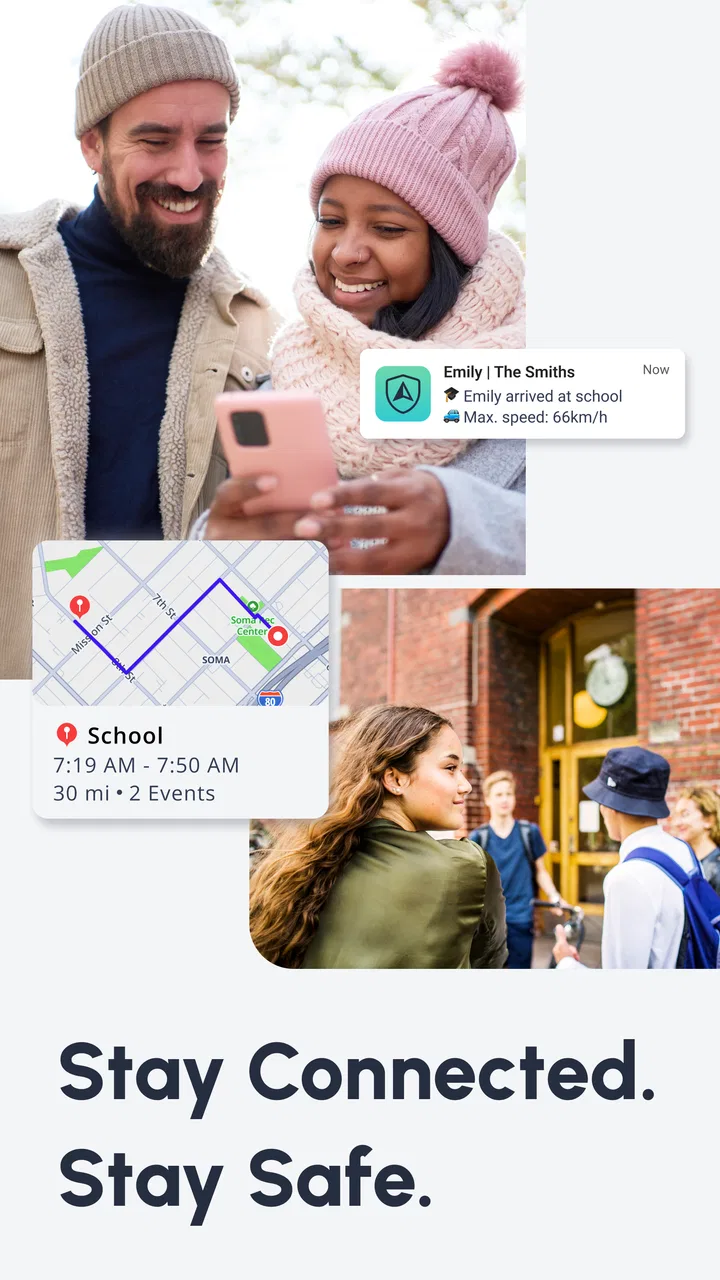
The central capability is the family location view. Instead of relying entirely on calls or manually written updates, I can use the app to see where family and friends are, check movement history, and receive alerts connected with location. That combination is more useful than a map pin that only answers one question at one moment.
For parents, the benefit is mainly coordination. A teenager who is traveling between school, an activity, and home may not answer immediately. A family member driving across town may be concentrating on the road. When location information is available in the app, I can often understand the situation without interrupting them. That does not replace communication, but it can make communication more targeted.
The “360” approach also matters because family tracking is rarely just about the present. If I only need to know where someone is right now, a basic location-sharing tool may be enough. When I want to understand whether a person has left, whether they are still moving, or whether a familiar routine has changed, the history and alert side becomes more relevant.
I would not describe this as a substitute for good judgment. A location can be delayed, inaccurate, or misleading in a crowded area, inside a large building, or during a trip where connectivity changes. The app is best treated as a helpful layer of awareness, not as proof that someone is safe simply because a marker appears on a map.
Why history and alerts are more useful than a live map alone
The less obvious strength is the way past and present information can work together. A live location tells me where a person appears to be. Location history gives context. If a child is not yet home, the history may help me see whether they are still traveling or have stopped somewhere along the way. If a partner is late, the sequence of movement can be more informative than repeatedly sending messages.
Alerts can also change the app from something I check constantly into something that works in the background of a routine. Rather than opening the map every few minutes, I can use notifications to draw attention to a relevant change. This is particularly helpful for parents who are busy working, cooking, or caring for another child and cannot monitor a screen continuously.
There is a trade-off here: alerts are only helpful when they are chosen carefully. Too many notifications can turn into noise, and noisy safety tools are easy to ignore. I would begin with the smallest set of alerts that answers a real household question, then adjust after a few days. The goal is not to watch every movement; it is to notice the events that genuinely require attention.
How I would set it up for a household
I would start by agreeing on the purpose with everyone involved. For a family, that might mean knowing when a child leaves school, checking whether a driver is still on the way, or keeping track of relatives during a busy day. Explaining the reason first is important because location sharing affects trust as much as convenience.
Next, I would organize the app around regular routines instead of trying to follow every person equally all day. A parent may need more visibility during a child’s commute than during a normal afternoon at home. A household member who drives long distances may benefit more from driving insights than from constant map checking. This keeps the app focused and makes its information easier to interpret.
I would also spend time reviewing how location history appears before depending on it. The practical question is not simply whether a route is displayed, but whether it is clear enough to understand a real situation. If the map is busy or the history takes too much effort to read, I would use direct contact for urgent matters rather than assuming the app can answer everything.
My strongest setup tip is to define what action an alert should trigger. If an alert arrives, should I wait, call, check the route, or contact another family member? Making that decision in advance prevents a notification from creating more anxiety than clarity.
A realistic school-day example
Imagine a child normally leaving school and heading to an after-school activity before returning home. On one afternoon, the child is delayed and does not notice several messages. I can check the current location, look at the recent movement, and decide whether the delay looks like ordinary travel or a meaningful interruption. If the app provides a relevant alert, I can respond to that instead of repeatedly refreshing a map.
That workflow is where I think Scout: Family Location 360 earns its place. The value is not dramatic every day. Most days, it may simply confirm that everyone is moving through ordinary routines. On a confusing day, however, having location, history, and alerts together can save time and reduce unnecessary calls.
Driving insights add another angle for households with regular drivers. I would use them as a conversation starter rather than as a scorecard. If the information suggests a pattern worth discussing, the useful response is a calm conversation about safer driving habits. Turning every insight into criticism would make the app feel like surveillance and could undermine the cooperation that location sharing depends on.
Where it fits beside familiar alternatives
The usual alternative is a phone’s built-in location-sharing service. Those tools can be perfectly adequate when all I want is a temporary map position or when everyone in the household already uses the same phone ecosystem. They may feel simpler for a small group with uncomplicated needs.
Scout has a different emphasis. Its identity is more clearly centered on families, with location history, alerts, and driving insights treated as part of the same experience. That makes it more appealing when I want an ongoing household routine rather than occasional one-to-one sharing.
Messaging apps are another common substitute. They are excellent for asking someone to confirm plans, but they depend on the person replying. Scout is more useful when the practical question is about movement and timing rather than a written conversation. On the other hand, a message remains better when I need an explanation, a change of plan, or reassurance that a map cannot provide.
Dedicated family-safety services may offer a more specialized experience for households that want extensive controls or a highly structured monitoring system. I would look in that direction if the family needs a very specific safety workflow. Scout is a better fit for people who want a straightforward location-centered tool without turning every part of family life into a formal tracking process.
The privacy conversation is part of the product experience
Any location app changes the relationship between convenience and privacy. I would not install it on a child’s phone and treat the matter as settled. The family should discuss who can see locations, when sharing is useful, and when it is reasonable to pause or limit it. Older children and teenagers are more likely to cooperate when they understand the purpose and have a voice in the arrangement.
It is also worth remembering that location history can reveal routines. School times, work patterns, regular visits, and travel habits may become visible through repeated use. That does not make the feature bad, but it does mean the app should be used deliberately. I would avoid treating historical movement as a way to investigate every small change in behavior.
For younger children, the app can support practical supervision, but it should not replace teaching them how to contact a trusted adult, recognize unsafe situations, or explain where they are going. For adults, mutual agreement matters even more. A partner-tracking arrangement that feels one-sided can create tension regardless of how well the technology works.
The friction I noticed in the everyday experience
The first limitation is that location tools depend on the phone environment around them. Battery-saving behavior, weak connectivity, indoor locations, and device settings can all affect how timely or precise a location appears. I would never use a map update as the sole basis for an emergency decision.
A second issue is interpretation. A dot on a map looks authoritative, but it does not explain why someone is there. A person may have stopped to help a friend, taken a different route, or left the phone somewhere while moving. History can provide clues, yet it cannot supply the human context of a conversation.
Alerts also require maintenance. A notification that was useful during a school commute may become irrelevant during holidays, a change of school, or a new work schedule. If nobody reviews the setup, the app can gradually produce outdated warnings. I would check the alert arrangement whenever a regular routine changes.
The driving insights deserve the same caution. They may help identify patterns, but they should not be presented as a complete assessment of a driver’s ability or character. Road conditions, passengers, traffic, and unfamiliar routes all influence a journey. Used constructively, the information can support safer habits; used harshly, it can create arguments.
Who benefits most from Scout
I think the strongest audience is a family with several people moving independently through the day. Parents coordinating school and activities, couples sharing commuting information, and relatives checking in during travel can all find a practical reason to use it. The app is especially suitable when the household wants more than temporary location sharing but does not need a highly specialized monitoring system.
It can also help families who are tired of sending repeated status messages. If the same questions come up every day—whether someone has left, whether a driver is still traveling, or whether a person has reached a familiar destination—location history and alerts can reduce that repetitive communication.
I would be more hesitant to recommend it to someone who dislikes ongoing location sharing, has no regular need to coordinate movement, or expects perfect real-time accuracy. In those cases, a simple phone call or occasional location share may be less intrusive and easier to understand. It is also not the right choice for anyone hoping that an app can replace supervision, emergency services, or honest family communication.
The free price makes it easy to try without committing money, and the Everyone age rating keeps the entry point broad. Still, the real cost is attention: people need to agree on boundaries, respond sensibly to alerts, and remember that digital visibility is not the same as certainty. That is a worthwhile exchange for some families, but not for every household.
My recommendation after using its main tools
Scout: Family Location 360 is most convincing when I use it as a quiet coordination tool rather than a constant surveillance screen. Its combination of family location, history, alerts, and driving insights gives it more practical range than a bare map-sharing feature. The app’s four-point average from around one hundred twenty thousand ratings and its broad install base show that the concept connects with many users, but the experience still depends heavily on sensible setup.
I would recommend trying it for one clearly defined routine first, such as a school commute or a shared driving schedule. That makes it easier to judge whether the alerts are useful, whether the history is understandable, and whether everyone is comfortable with the arrangement. If it reduces unnecessary checking without creating new arguments, it is doing its job.
My final view is positive but measured: Scout: Family Location 360 is best when it turns uncertainty into useful context, not when it encourages constant checking. For families that need ongoing location awareness and want driving information in the same app, it is a sensible free option from Telenav, Inc. For people who only need an occasional map pin or who place privacy above continuous coordination, a simpler alternative may be the better choice.
FAQs for Scout: Family Location 360
01What is Scout: Family Location 360 used for?
Scout: Family Location 360 is designed to help families stay connected by sharing real-time or recent location information, depending on the features enabled in the app. It can be useful for checking whether children have arrived safely, coordinating with relatives, or locating members of a private family group. The app is intended for consensual sharing, so everyone included should understand what information is being shared and why.
02Does Scout: Family Location 360 track a person without their knowledge?
No legitimate family-location service should be used to secretly monitor another person. Location sharing generally requires the user to install the app, grant the necessary permissions, and join or accept a family group. Before downloading, review the app’s permission requests and privacy policy carefully. Parents and guardians should also explain location sharing to children in an age-appropriate way and use the service responsibly.
03Does the app require GPS, mobile data, or internet access?
Yes, location features normally depend on the phone’s GPS, Wi-Fi, and mobile network connections, while internet access is needed to send location updates to the account or family group. Accuracy can decrease indoors, underground, in crowded urban areas, or when the phone has weak reception. Battery-saving settings, disabled background activity, or revoked permissions may also delay updates or prevent location information from appearing.
04Is Scout: Family Location 360 free to use?
The app may offer free access to basic functions while reserving advanced tools, extended history, alerts, or additional family features for a subscription or in-app purchase. Pricing and available plans can vary between Android and iOS, as well as by region. Check the current store listing before installing, and carefully review trial terms, renewal dates, and cancellation instructions so you are not surprised by recurring charges.
05What should I check before installing Scout: Family Location 360?
Before installing, verify that your device meets the current Android or iOS requirements and that you have enough storage and battery capacity for location services. Read the developer’s privacy information, examine requested permissions, and confirm how location data is collected, stored, and shared. You should also discuss consent with family members, enable account security, and test alerts and location accuracy before relying on the app for safety-critical situations.
Pros
- Accurate location sharing helps families coordinate pickups and daily plans.
- Place alerts can notify you when someone arrives at or leaves a saved location.
- Private groups make it easy to share updates only with selected family members.
- Location history can help review recent movements when necessary.
- Emergency features provide an extra way to contact trusted family members quickly.
Cons
- Continuous GPS use may noticeably reduce battery life on some phones.
- Some useful safety features may require a paid subscription.
- Location accuracy can drop indoors or in areas with weak signal.
- All family members need compatible devices and active internet access.
- Constant tracking may feel intrusive
- especially for older children or adults.

Scout: Family Location 360
Gallery